If the keys are physically present but typing is not registered: Computer keyboard not working: where to start?
Keep the parts and stop repeated attempts
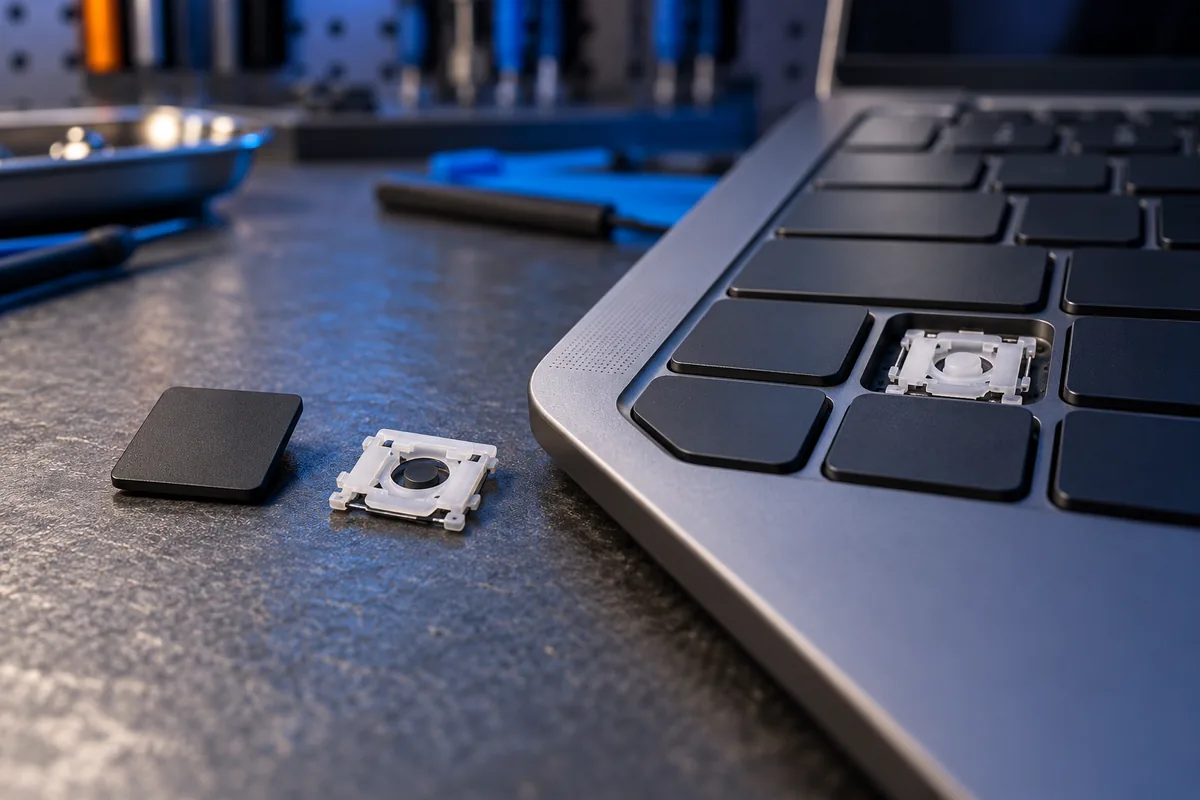
Switch the laptop off and disconnect its charger before inspecting the key area. Put the cap and any small pieces in a container. Photograph the keyboard and the underside of the cap in good light. Do not remove a neighbouring key simply for comparison, as that can create another problem. Mention any liquid spill separately rather than treating everything as a detached cap.
Distinguish the cap from the mechanism
An intact cap may have come loose, its retaining clips may be broken, or the scissor mechanism underneath may be damaged. A key that remains attached but does not register is another situation. These symptoms do not establish the same repair. Dell’s instructions begin with inspecting both cap and mechanism, so establish what is damaged before assuming a whole-keyboard replacement is required.
Avoid force and adhesive
Refitting depends on the specific keyboard construction. Where the mechanism is intact and the manufacturer provides applicable instructions, follow those instructions. Stop if the part resists or its correct position is unclear. Adhesive cannot replace the designed clips and may enter moving parts. Larger keys such as Space, Enter and Shift may have stabilisers, so a small letter-key example is not universal.
Identify the exact keyboard variant
The laptop brand alone is insufficient for choosing a replacement. Provide the exact model, keyboard layout and clear photographs. Lenovo, for example, documents individual cap replacement for particular models; that procedure should not be generalised to every laptop. Before ordering a keyboard, assess the base, mechanism and possibility of a local repair. Visual resemblance is not sufficient evidence that a donor key fits.
Use a temporary alternative sensibly
If there was no liquid spill or other damage, an external keyboard can provide a temporary way to work. Do not press the exposed mechanism with a sharp tool or leave loose pieces around it. Send photographs when asking about keyboard replacement and explain whether the key worked before it detached. The repair choice depends on the clips, mechanism and keyboard function together.
Sources and further reading
Need help in Vilnius?
Describe the symptoms and tell us your computer model. We will assess the situation, suggest suitable work and agree on the price before starting.